

Formatting Resources
Why Formatting?
All dissertations and theses are archived digitally in BearDocs and may be made available internationally via ProQuest Dissertation Services (UMI). Baylor dissertations are requested roughly 21 times a month through this service. (You have the option to restrict access to your work, if desired.) The quality of these works reflects the standards of Baylor University, the Graduate School, your department or institute, and the professors who work with you on this project. The responsibility for both the content and format of your dissertation/thesis rests solely with you and your advisory committee. The Graduate School is here to assist you in doing the job effectively and efficiently.
Baylor Formatting Guidelines
- Formatting Guidelines: Click here for a printable Word document version of the information below.
- Formatting Checklist for Dissertation and Thesis Students
Dissertation/Thesis Templates
- Dissertation/Thesis Template (Word Doc): This template also serves as a model and includes explanations within the body text of each section. We highly recommend that you use this template for your final manuscript.
- Dissertation/Thesis Template (LaTeX): This template is not required for LaTeX users but is an option for those who wish to use it. You can upload the files into the LaTeX editor of your choice (e.g. Overleaf, TeXStudio, etc.) Note: Your manuscript must still comply with our formatting guidelines. Our department does not have editing support for LaTeX. If edits are required, it is the student's responsibility to reach out to their department or other resources for help. Do not include your signature page in the main document. Use our signature page below.
ADA Accessibility Requirements for Dissertations and Theses
Overview
A new ADA compliance policy affecting dissertations and theses deadline has been revised to April 2027. These updates align with revised ADA Title II regulations governing the accessibility of web content provided by public institutions, including universities.
Regulatory Update
In April 2024, the Federal Register published updates to ADA Title II regulations requiring that web-based content meet WCAG 2.1 Level AA accessibility standards.
All materials published to institutional repositories on or after April 24, 2026—including dissertations and theses—must comply with these standards.
Why Accessibility Matters
Accessibility is most effective when implemented during the document creation process. Students and advisors should ensure that accessibility best practices are incorporated from the beginning to avoid delays in submission and approval.
All documents submitted to Vireo and approved by the graduate school must meet WCAG 2.1 Level AA standards.
Responsibilities
Students and Advisors
Students and advisors are responsible for ensuring that dissertations and theses are fully accessible prior to submission. This includes:
- Using approved templates and formatting resources
- Applying accessibility best practices throughout document creation
- Verifying that all submitted materials meet ADA accessibility requirements
Key Elements of Accessible Documents
To meet accessibility standards, documents should include:
- Structured Headings: Use built-in heading styles to organize content; include tags and bookmarks in PDFs
- Clear Language: Write in plain language and define abbreviations upon first use
- Descriptive Hyperlinks: Clearly indicate the destination of links
- Alternative Text: Provide alt text for all images, charts, and figures
- Color Contrast: Ensure sufficient contrast between text and background
- Accessible Tables: Use tables appropriately and identify row and column headers
- Formatted Lists: Use built-in bullet or numbering tools for lists
Submission Requirements
(Effective for submissions Fall 2026)
To support compliance with accessibility standards, students must:
- Run the Microsoft Word Accessibility Checker
- LaTeX users should run the Adobe Acrobat Accessibility Report
- Make a reasonable effort to resolve identified accessibility issues
- Most issues are expected to involve missing alternative text
- Upload a screenshot of the accessibility report with the final submission
Implementation Timeline
- Fall 2026 Graduates and Beyond:
A formal accessibility review process will be implemented in August and will be required for all submissions. Formatters will outline what is needed to comply during the preliminary review process.
Dissertation and Thesis Guidelines
The Standard Format is the default format used for dissertations and theses. The body of the dissertation resembles a book manuscript, including front and back matter, an introduction, body chapters, and a conclusion according to expectations of the student’s discipline. Some, for example, might have literature reviews or methods sections, while others might not. The formatting rules described in this manual should be applied to all material except for specific body chapters that have previously been published or are actively in the process of being published. Thus, except for certain disciplines, the vast majority of dissertations and theses use the standard format throughout their entire manuscript. Unless specified by your department, you should adhere to the following guidelines.
All graduate programs at Baylor University have selected a nationally recognized style manual for their dissertations and theses. In case of conflict, the Graduate School specifications below always supersede your program’s chosen manual of style. For a departmental list of approved style manuals, see link. Your style guide will determine how you format your tables, figures, and citations.
A serif font is required (e.g. Times New Roman).
Use the same font throughout, including page numbers.
12-point size is required for the body of the dissertation/thesis.
10-point is acceptable for footnotes, tables, figures, etc.
Use italics sparingly.
No bolding (exceptions: social work, and figures)
Consistent margins and page numbers must be maintained throughout the entire work. All typing (except for pagination) and all parts of tables, figures, and appendices must fit within the specified margins.
Top and Bottom Margins: 1 inch
Left and Right Margins: At least 1 inch. You may want to have 1.25 inch side margins if publishing a hard copy with a different vendor other than Proquest.
All regular text in body paragraphs must be double-spaced throughout, with no additional space between paragraphs of the same style. The following content types are single-spaced with a double-space in between:
Footnotes or endnotes
Bibliography entries
Block quotations
Spacing requirements addressed throughout this document will use multiple terms: single space, double-space, and triple space.
Single Space: Lines have no extra space between them.
Double-space: One single space blank line between lines of text.
Triple-space: Two single space blank lines between line of text
Format and Application of Page Numbers
Do not number: abstract, signature page, or copyright page .
Number with lowercase Roman numerals (e.g. i, ii, iii): table of contents, list of figures, list of tables, preface, acknowledgments, attributions and dedication pages (in this order). Numbering begins on the table of contents, but all front pages are counted.
Number with Arabic numerals (e.g. 1, 2, 3): the first page of chapter one, and continue throughout the entirety of the document, including reference pages. On Chapter One you will restart your page numbers back at 1.
Page numbers should be the same font as the body of the document.
Placement of Page Numbers
All pages are numbered at the bottom of the page, center justified, and within a one-inch footer.
Page numbers are the only material on any page that goes outside of the margins specified above.
Align text at the left margin (except for paragraph indentations).
The right margin may be either uneven (ragged) or right-justified but be consistent throughout.
Footnotes
Use superscript numerals within the text at the point of reference.
Number footnotes consecutively by chapter (i.e., begin each chapter with number one).
Maintain the 1 inch margin at the bottom of each page except on the last page of the chapter. When the body text on the last page of a chapter does not fill the entire page, the footnotes for that page should follow directly under the text (no white space between the last paragraph and the footnotes).
Footnotes must begin on the page where referenced.
Each footnote is single-spaced, with a double space between footnotes.
Footnotes may be typed in a 10- or 12-point font.
Use paragraph indentation (0.5” indent) for the first line of footnote texts and the footnote number. If the footnote goes onto multiple lines, all subsequent lines are not indented.
Only repeat full footnote references at the beginning of each chapter if preferred by the department.
Endnotes
Title the first endnotes page “Notes”; this title should be 1 inch from the top of the page, followed by a double space.
Each endnote is single-spaced, with a double space between endnotes.
Endnotes should follow your department’s chosen manual of style but typically are set with paragraph indentation.
Five Headings Levels (use unless department requires another style)
Level 1: Designates chapter number, is centered and typed in all uppercase letters with the number spelled out. (e.g. CHAPTER FOUR) When the Level 1 heading is followed by a Level 2 heading, there is a double-space between the two headings. When the Level 1 heading is not followed by another heading, the Level 1 heading should have a triple or double (consistently in document) space below it. All Level 1 headings should start 1.5” from the top of the page.
Level 2: Indicates the title of the chapter, is centered with uppercase and lowercase lettering and with a triple or double (consistently in document) space below.
Level 3: Is centered and italicized with uppercase and lowercase lettering with triple or double (consistently in document) space above. Level 3 headings are followed by a triple or double (consistently in document) space.
Level 4: Is typed flush at the left margin, is italicized in title case with triple or double (consistently in document) above and below.
Level 5: Is indented at the beginning of the paragraph with triple or double (consistently in document) space above, is italicized, using sentence-style capitalization, ending in a period (which also is italicized) and followed by 2 spaces, the text continues after the heading on the same line.
For an example of proper heading usage, see the template.
Dissertations and theses consist of three sections: front matter, body, and back matter. The number of chapters and components included in each section will vary by the student according to the particulars of the project. The overview below indicates the proper order of each of the components within each of the sections. Additional information for each component is detailed in the following sections.
Front Matter Components
Abstract*
Unsigned Signature/Title Page*
Copyright page*
Table of Contents*
List of Figures
List of Schemes
List of Tables
List of Abbreviations
Glossary
Preface
Acknowledgments
Dedication (optional)
Attributions**
Epigraph (optional)
Body Components
Chapter One: Introduction
Body Chapters (may include a literature review, methods section, previously published manuscripts as full chapters, etc. depending on your project)
Chapter X: Conclusion
If using previously published manuscripts as chapters, we encourage you to include an introduction chapter and a conclusion chapter.
Back Matter Components
Epilogue
Appendices (as needed)
Bibliography/References*
Index (optional)
Abstract (un-paginated)
The abstract briefly summarizes the contents of the document.
For dissertations, the abstract is limited to 350 words; for theses, the limit is 150 words. (Be advised that editors at UMI Dissertation Services, without consulting the author, will shorten abstracts that exceed these limits.)
The abstract page is the only page that requires a 2.5-inch top margin.
If a student has two mentors, then they will use the term co-mentor. The first co-mentor will be identical to the example. The second co-mentor will be one line below. Both will include the title Co-mentor before their name.
For example, see link.
Signature Page (un-paginated)
Signature page templates and instructions can be found here. A properly formatted version is due at the Preliminary Technical Review.
The signature page is unnumbered.
We will need a single unsigned signature page and a single signed signature page in digital format. You may obtain electronic signatures, or you may scan a copy of your signed signature page. Regardless, we will not accept paper copies.
The Dissertation and Thesis Office will insert your unsigned signature page for you at the time of approval. Until then, please keep a “Hold for signature page” in your document to allow for proper page numbering of the following front matter.
For an example of a signature page, see link.
Copyright Page (un-paginated)
For an example of a copyright page, see the link.
Ensure that your copyright page uses the exact name you use on your abstract and on your signature page. All three should match.
Table of Contents (Lowercase Roman numeral pagination begins)
This is the first page where pagination appears, although previous pages are counted. (This should start on iv if you have a one page abstract or v if you have a two-page abstract).
Right-justify the page numbers at the right margin (but not the entire line) for each included heading.
Table of Contents entries that go onto multiple lines should be single spaced.
The page number column on the right should be free of any text. If a title runs into the page number column, move the last word and subsequent text to the next line.
Leading dots are required to connect the heading with the page number. Leading dots must not be on a line alone. If so, move a word from the heading title to the line below.
Include at least the first three levels of headings. All level 1 headings can be in all caps if desired, but all level 2 and level 3 headings should be un-italicized and in title case.
Double-space between headings but single-space and indent any continuation lines of the same heading.
Add a blank line above each level 1 heading to separate each chapter from one another.
Lists of Figures, Schemes, and Tables
These pages are required if any figures (illustrations), schemes, or tables are included in the document.
The titles of these sections are typed as first-level headings, centered and all uppercase, 1.5 inches from the top of the page, followed by a triple space.
If the legend or caption of the figure, scheme, or table is brief within the text, then include the entire legend or caption in this list. If the legend or caption is long, use an abbreviated legend or caption in this list.
Follow the same formatting as the Table of Contents.
These lists are numbered using lowercase Roman numerals centered, continuing from the Table of Contents.
List of Abbreviations
This page is optional.
The title of this section is typed as a first-level heading, centered and all uppercase, 1.5 inches from the top of the page.
It is paginated with lowercase Roman numerals.
The entries are single-spaced where the text is more than one line, with a double space between entries.
Attributions
This page only applies to students incorporating research or writing performed by co-authors and co-researchers. This includes chapters that have already been published or chapters that would list co-authors if published in the future.
This section should mention the specific contributions of each author of each applicable publication/chapter, including the author of the dissertation.
The title is typed as a Level 1 heading, centered and all uppercase, 1.5 inches from the top of the page.
Attributions are paginated with lowercase Roman numerals.
Acknowledgments
This page is optional.
It is the place for the author to professionally acknowledge the various sources of direction, advisement, assistance, funding, etc. that facilitated the project. It is also where the author can acknowledge people or things of personal importance.
The title is typed as a Level 1 heading, centered and all uppercase, 1.5 inches from the top of the page.
Acknowledgments are paginated with lowercase Roman numerals.
Write the body of this section in prose paragraph format (double spaced, 12-point font, indent all paragraphs).
Note that Baylor’s spelling of Acknowledgments only has two ‘e’s. Do not write ‘Acknowledgements.’
Dedication
This page is optional.
If this page is included, students may choose whether or not to include the title “Dedication.” If the title is to be present, it is typed as a Level 1 heading, centered and all uppercase, 1.5 inches from the top of the page.
The text of this page is typically brief and is more personal in nature than the Acknowledgments.
The text of this page typically begins with “To:”
The text should begin approximately at 3 inches below the top of the page.
Generally, there is no ending punctuation.
The dedication page is paginated with lowercase Roman numerals.
*Unless a chapter has been previously published or has already been submitted for publication, the following formatting is required. See CHAPTER SEVEN for information on incorporating previously published work.
Chapters (Arabic numeral page numbers begin.)
The number of chapters and their titles may vary according to topic and discipline.
Always spell out chapter numbers in the headings and in the body of the document.
Consult with your mentor or program director to determine the chapter designations (if any) that have been adopted by your program.
“Introduction” and “Conclusion” are always labeled as chapters (e.g. CHAPTER ONE instead of INTRODUCTION). “Introduction” and “Conclusion” would be Level 2 headings.
Block Quotations
Block quote should be indented ½ inch, unless otherwise specified by your department style guide.
Always single-spaced with double-space above and below.
Epigraphs
Epigraphs are quotations that are used at the beginning of a dissertation/thesis, chapter, or section to allude to a central idea or theme.
Epigraphs should be placed under the level 2 headings with a triple or double space above and below.
Treat epigraphs as a block quotation.
Do not justify the text of the quotation; instead leave a ragged right edge.
On the line below the quotations, provide the citation or the author’s name in the bottom right corner of the quote (a formal citation is unnecessary).
Add a double space following an epigraph.
Equations
Equations should be centered with a double space above and below.
Numbering Tables, Figure, and Schemes
All tables, figures, and schemes are referenced by number within the text prior to the placement of the table.
All tables, figures, and schemes in the body chapters are numbered by chapter and order of appearance. (Chapter 1: Table 1.1, Table 1.2, etc. Figure 1.1, Figure 1.2, etc., Scheme 1.1, Scheme 1.2, etc.; Chapter Two: Table 2.1, Table 2.2, etc. Figure 2.1, Figures 2.2, etc., Scheme 2.1, Scheme 2.2, etc.).
All tables, figures, and schemes within an appendix are numbered with the letter of the appendix plus the number (i.e., A.1, B.1, etc.).
Pages with tables, figures, and schemes are paginated in sequence with text pages.
Formatting Applicable to all Tables, Figures, and Schemes
Ideally, the typeface used within a table, figure or scheme should match the typeface used in the text.
Font size within the table, figure, or scheme should not be smaller than 10 point.
Generally, borders are not used around tables, figures or schemes.
Tables, figure, and schemes may be displayed either landscape or portrait orientation if they are on a page of their own.
All tables, figures, and schemes must fit within the 1-inch margins.
If a table, figure, or scheme does not fit within the margins they can be placed on a page that is then set to landscape. This will provide more space for wide tables, figures, or schemes.
If the table, figure, or scheme and its caption/legend are greater than about three-quarters of a page, then allocate an entire page to that figure; in such cases, center the figure so that equal amounts of blank space occur above and below the table, figure, or scheme and to the left and right of the table, figure, or scheme.
Figures and schemes, and their respective legends should be embedded within the text if they occupy less than approximately three-quarters of a page.
For figures, schemes, and tables, black-and-white or color images are permissible.
If the original of a figure is in color, then the figure should be reproduced in color.
ProQuest/UMI Dissertation Services offers several recommendations regarding figures. Among them are that lines on graphs should be identified by labels or symbols rather than by colors.
Consult your departmental style guide for further instruction in creating tables, figures, and schemes.
Formatting Specific to Tables and Captions
Every table column should have a heading. Repeat heading columns if tables take up multiple pages.
The table caption is always single-spaced and center-aligned. The table should be center-aligned as well.
Leave a triple or double (consistently in document) between the preceding text and the table caption, a double-space between the caption and the body of the table, and a triple or double(consistently in document) below the table before resuming text.
The typeface and font size used within a table should match the typeface used in the caption and the text. If necessary, the font size may be decreased to 10 point, but not smaller.
Tables and their captions should be embedded within the text if the table and caption occupy less than approximately three-quarters of a page.
Formatting Specific to Figures, Schemes, and Legends
There should only be one figure or scheme legend per figure
The figure or scheme legend is placed below the figure or scheme and single-spaced.
If a figure or scheme legend is one line, the legend is centered.
For figure or scheme legends over one line, both lines of the legend should be left justified.
Leave a triple or double space (consistently in document) between the preceding text and the top of the figure or scheme, a double- space between the figure or scheme and the legend, and a triple or double space (consistently in document) below the legend before resuming text.
The only required reference component is the bibliography (others are included as appropriate).
• Order reference pages as follows:
Endnotes
Appendices
Additional reference material (e.g., glossary)
References, Bibliography, and/or Works Cited Index
• The titles of reference page sections are level 1 headings; they are centered, typed in all uppercase letters, and (except for appendices) placed at 1.5 inches from the top of the page with a triple space below.
Appendices
Appendices contain material that is too massive or is otherwise inappropriate to be incorporated within the body of the text.
The section of the document containing appendices begins with a separator page that bears the word “APPENDIX” if only one is included or “APPENDICES,” if more than one is included.
This word is in uppercase lettering and is centered horizontally and vertically. The page number of this separator page is centered at the bottom of the page. Appendices are designated with capital letters, beginning with A; if there is only one appendix, then do not assign it a letter.
The first page of each appendix bears a first level heading, such a “APPENDIX C”, placed 1.5 inches from the top of the page, followed by a double-space, then a title (in the format of a level two heading).
Pagination is continuous with the rest of the document with page numbers placed at the bottom of the page, centered.
If the material in an appendix is photocopied or scanned in from another source, then it, with its original pagination, must fit within the standard thesis margins. Be sure that reduction does not shrink printing so small that it is illegible.
If photocopied material is included, it must be of high resolution.
Bibliography/Works Cited/References
The title of this section varies by discipline and department specifications.
The text of each entry should be single-spaced.
For entries over one line, use a 0.5-inch hanging indent.
Double-space between each entry.
Do not split entries across pages.
Each page of the REFERENCES following the level 1 heading should begin at the 1” top margin.
All hyperlinks should be in black font with no underlining. If they exceed the margins, break the entry after a backslash or logical marker.
The style used within a citation (e.g., sequencing of author, date, title, and other information; abbreviation or full spelling of periodical names; etc.) is determined by your department or program’s chosen style guide.
Inclusive pagination should be used within the citation.
References for Published Articles
Published manuscripts may include the reference lists for individual chapters.
The dissertation bibliography will then be a comprehensive list of chapter references in addition to other references, arranged in an alpha or numeric list.
The Graduate School allows students to use/reproduce, as body chapters, one or more articles that have been published or are already under review by an academic journal. A general introduction may provide an overarching context for the project, including a short explanation of the overall research agenda as well as the importance and consequences of this research. A conclusion drawing the chapters together is also encouraged.
All Co-Authored Work
Attributions Page
All students incorporating publications that were a collaborative effort of co-researchers or co-authors must include an Attributions page within their front matter, regardless of whether that work is already published. This section should mention the specific contributions of each author of each publication, including the author of the dissertation, for each published chapter. A sentence per contributor is sufficient.
Previously Published Material
With the permission of their department, students may wish to reproduce one of their previously published articles as a chapter of their dissertation. The Dissertation Guidelines on our formatting page give instructions on how to incorporate this material.
Formatting Previously Published Material
With certain caveats, students may maintain the formatting used for the published version of their article for ease of formatting. When incorporating a previously published chapter:
- Table/caption, figure/legend, and heading formatting may differ from traditional Baylor formatting as long as the formatting within the chapter is internally consistent.
- Article-specific abstracts, keywords, and references may remain with the specific chapter.
- Regardless, a fully consolidated reference list, including all references for previously published material, is required at the end of the entire dissertation.
Exceptions to journal-specific formatting:
- Students must maintain Baylor's required margins and font size, avoid using bold, and use a single column of text.
- Figures and Tables should be numbered consecutively throughout the entire dissertation (1.4, 2.3, etc.)
Publisher Permissions
Students are required to provide copies of publisher permissions for reproduced material. A screenshot from the journal's website, a Word document with the relevant copy-and-pasted information and a link, or an email from the publisher are all acceptable to fulfill this requirement. If you are having trouble finding or identifying publisher permissions, please contact the libraries at copyright@baylor.edu for assistance You will upload these publisher permissions as "administrative" documents to the Baylor submission portal when uploading your manuscript draft.
Petition to Include Non-First Author Publications
PhD candidates may use prior publications as chapters in their dissertations when approved by their departments. While students are typically the sole or first author on publications included in their manuscript, sometimes exceptions may be made with Graduate School approval. We also recognize that some disciplines list authors alphabetically or using other criteria within their publications. Committee chairs may petition on behalf of their student to include publications on which students are not the first author by completing this form.
Eligibility
In many of Baylor’s graduate programs, publication of dissertation research has become a requirement for earning the degree. With the exception of fields that alphabetize authorship (e.g. mathematics), students must be the lead contributor of the included published work. If not the first/sole author, permission for use in the dissertation must be granted through the Graduate School deans. Committee chairs must submit a petition justifying the chapter’s inclusion in the dissertation or thesis using our online form.
Copyright
If you intend to include this published research in your dissertation, you need to be certain that the publisher of your journal article will allow you to do so. This is handled during the publication process as you negotiate the copyright assignment agreement with the journal publisher. For more information on this vital topic, consult the Avoiding Copyright and Plagiarism Issues document.
The student must also provide Baylor University with a letter or email of copyright release from the journal or publisher. If publisher permissions are readily available on the journal’s website, a screenshot and link to that information will suffice. This is submitted as a administrative file to the Vireo submission portal.
Formatting Previously Published Work
Chapters that have been at the very least submitted to a journal may use that journal’s formatting guidelines for that specific chapter, with some exceptions (listed below.) Chapters that have not yet been submitted for publication must be formatted according to Baylor Graduate School’s Standard Format. In all cases, front matter and back matter will follow our Standard Format. A few general formatting requirements also still apply to chapters using the published journal article’s format:
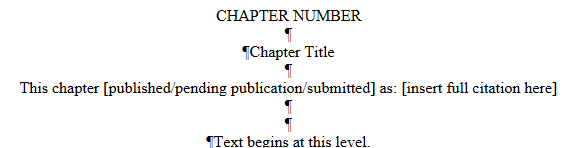
Each previously published manuscript constitutes a new chapter within the thesis/dissertation. The chapter heading should begin with the Standard Format guidelines, including a level 1 heading (CHAPTER X) with the chapter title as the level 2 heading.
The student should provide a full literature citation of the article beneath the level 2 chapter heading. Double-space after the chapter title (level 2 heading), then type “This chapter published as:” and then insert the full citation, using the format specified by your style guide. The citation should be centered, 12 point font, and single-spaced. Follow the citation with a triple or double space (consistently in document).
If accepted but not yet published, use “This chapter pending publication as:”
If submitted but not yet accepted for publication, use “This chapter submitted to [Author Name and Title] as:”
Margins and page numbers must follow the standard format.
Figures and tables should be numbered consecutively by chapter and figure/table number (eg. 1.1, 1.2; 2.1, 2.2). (This will likely deviate from the numbering within each manuscript but aids in the flow of the dissertation/thesis.)
The Graduate School reserves the right to require minor changes to the manuscript format to aid in the flow of the dissertation/thesis.
Additional Requirements
For published pieces with multiple authors, OR work that utilized the work of multiple contributors (i.e. the work would be published under multiple co-authors should it go to publication) the student must include an Attributions page explaining the contribution of each author in the front matter.
A full citation for the published or pending article should follow the level 2 heading, centered on the page.
Each chapter formatting should remain internally consistent.
If a previously published chapter has an appendix, then it will go at the end of the document in the appendices. It will remain formatted according to the guidelines of the chapter to which it belongs.
Published manuscripts may include the reference lists for individual chapters. The dissertation bibliography will then be a comprehensive list of chapter references in addition to other references, arranged in an alpha or numeric list.
Published pieces will need publisher permissions to be included in the manuscript. These copyright permissions should be uploaded into Vireo, but should not be included within the manuscript itself. If a piece has been submitted, permissions are not required.
The process is outlined on the website.
After your Defense
Do not submit this form until AFTER you have defended.
Complete your Copyright and Final Approval Form.
- Discuss and agree on an embargo option with your committee chair. Information about embargos is listed below as well as on the form itself.
- Within 10 days after the defense, students must submit this form using Bear ID and Duo Authentication.
- Committee chairs will receive an automated email with a link to approve the student's embargo selection and the final manuscript using Bear ID and Duo Authentication.
- Students and advisors will receive a confirmation email after the advisor's approval response has been received.
Options
Immediate Release
Two-year embargo
Five-year embargo
Baylor University’s Policy
Unless you choose to embargo (delay release) your Electronic Thesis/Dissertation (ETD), your document will be findable and openly accessible on the Internet via BEARdocs (http://beardocs.baylor.edu) in the semester following your graduation.
FAQ’s about Embargo Options
Why would I choose a two-year embargo?
You may desire this option if you have a pending journal publication and the publisher requests that you delay access to your thesis or if you have patent and/or similar proprietary reasons for withholding your thesis from open access. This option restricts access to your work for a period of two years. This embargo may be extended if an email is sent to the address below before the initial embargo ends. Note: Once your article is published, please send library personnel the citation information so that we can add this information to the descriptive information associated with your ETD so researchers will be aware of the publication.
Why would I choose a five-year embargo?
You may desire this option if you are (or will be) submitting material to a journal or book publisher. Some publishers prefer not to publish material that has been openly accessible. This option restricts access to your document for five years. This embargo may be extended if an email is sent to the address below before the initial embargo ends. Note: Once your article or book is published, please send library personnel the citation information so that we can add this information to the descriptive information associated with your ETD so researchers will also be aware of the publication.
Can I extend my embargo?
Yes. If you find it necessary to extend your embargo, send an e-mail to ask@baylor.libanswers.com before the initial embargo period ends.
Questions about availability options?
If you still have questions or concerns about availability options, please e-mail us at ask@baylor.libanswers.com.
Final approval of the pdf/a copy of your dissertation or thesis from the Graduate School is necessary before you can reach the final steps for graduation.